
Phones
Allows to add and delete the phone numbers used to receive calls for selected products and companies.
List of Phones

- Active numbers.
- Numbers that are no longer supported.
- Add a new number.
- Sort according to abbreviation, company name, the name of the email account, or last modified date.
- Ascending/descending sorting.
- Telephone number.
- Number name.
- Abbreviation of the product, the number is connected to.
- The company that uses the number. Can be set up in the company settings.
- Edit the number. Settings can also be opened by pressing the number or its name.
Phone ID
 Every Phone has its own ID. You can find it in the URL on a chosen Phone settings page.
Phone Settings
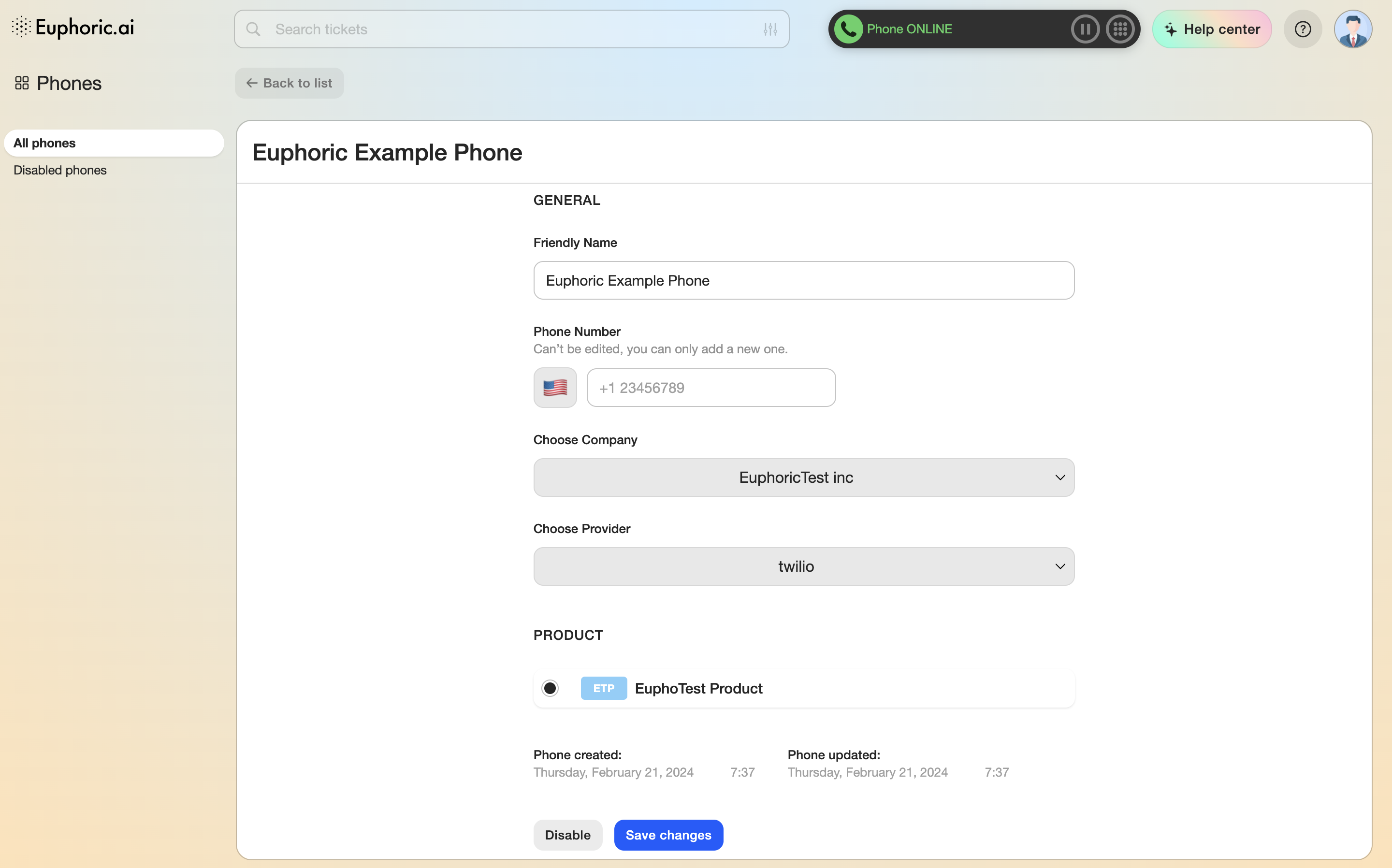
1. General
1.1 The name of the number.
1.2 Phone number. The country is determined automatically by the first digits. If the country can’t be determined, the country’s flag will be replaced with a pirate one.
1.3 The company, the number is assigned to.
1.4 Telephony operator.
2. Product
Selection of a product the number will be assigned to.
3. Status
Created and Last Modified dates.
The Save and Disable buttons can be found at the end of the list. A disabled number is transferred to the disabled phones list.